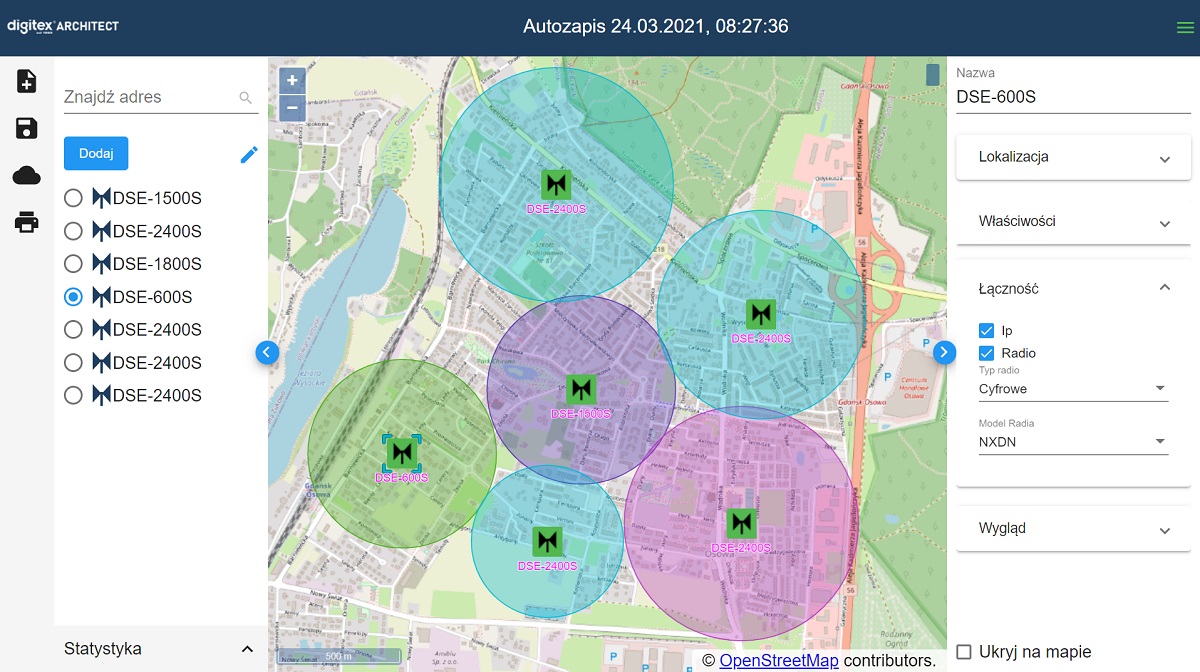
The digitexArchitect application allows you to design the location of alarm sirens on a selected site. By placing various siren types (with different output power) on the map, you can easily and quickly create a virtual system for alarming and notifying the population and assess the effectiveness of the acoustic coverage of the entire area.
MAIN SCREEN
The main page of the application consists of 3 panels. The left panel features function buttons, map is in the centre, while the right panel presents the properties of added sirens.
https://www.digitex.pl/wp-content/uploads/2021/03/Architect-save-project.mp4
STARTING A PROJECT
Start the project by registering as a user. To do so, fill in the required fields, i.e. name, e-mail address, city. Creating an account allows you to save your project and edit it in the future.
The second step is to save the project, that is to give it a name. A project without a name will be saved automatically (Autosave date and time).
https://www.digitex.pl/wp-content/uploads/2021/03/Architect-search-address.mp4
ADDING A SIREN
Enter the address where you want to place the siren in the Find Address field. Accept your choice of location with the magnifying glass or the enter button.
Then click on the Add button.
https://www.digitex.pl/wp-content/uploads/2021/03/Architect-location-1.mp4
ADDING A SIREN USING COORDINATES
Click the Add button.
Then in the panel on the right, in the Location tab, enter the geographical coordinates. Accept the selection with the magnifying glass.
Update the map view by clicking on the siren name (left panel).
https://www.digitex.pl/wp-content/uploads/2021/03/Architect-properties.mp4
SIREN PROPERTIES
The right panel displays editable siren parameters.
Here you can change the location and power of the siren, specify the noise level, surrounding building density and add the type of communication.
https://www.digitex.pl/wp-content/uploads/2021/03/Architect-add-new-siren-1.mp4
ADDING THE SIREN
Add another siren by clicking the Add button.
Adjust the properties of further sirens as required.
https://www.digitex.pl/wp-content/uploads/2021/03/Architect-remove-siren.mp4
DELETING A SIREN
Edit the object list by clicking the pencil on the left panel. Then delete the selected siren by clicking minus button.
https://www.digitex.pl/wp-content/uploads/2021/03/Architect-raport.mp4
REPORT
You can save and print your finished project.
The project will automatically save itself on the server for future editing.
Next time when you want to return to the project just log in and click Load project from server.